CREATE AND EDIT TABLES
CREATE AND EDIT TABLES
RDBMS
A relational database is a collective set of multiple data sets organized by tables, records and columns. Relational database establish a well-defined relationship between database tables. Tables communicate and share information, which facilitates data searchability, organization and reporting. A Relational database use Structured Query Language (SQL), which is a standard user application that provides an easy programming interface for database interaction.

Tables
A table is a set of data elements (values) that is organized using a model of vertical columns(which are identified by their name) and horizontal rows. A table has a defined number of columns, but can have any number of rows. Each row is identified by the values appearing in a particular column identified as a unique key index or the key field.

Columns or Fields or Attributes
A column is a set of data values of a particular simple type, one for each row of the table. The columns provide the structure according to which the rows are composed. For example, First Name, or Last Name are fields in a row.

Rows or Records or Tuples
A row also called a Record or Tuple represents a single, data item in a table. In simple terms, a database table can be visualized as consisting of rows and columns or fields. Each row in a table represents a set of related data, and every row in the table has the same structure.

CREATING DATABASE USING OPENOFFICE
To create a new database, click the arrow next to the New icon. In the drop-down menu, select Database (Figure 1). This opens the Database Wizard. You can also open the Database Wizard using File > New > Database.
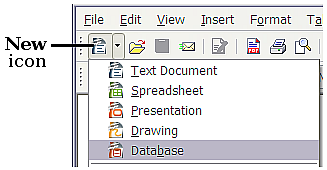
The first step of the Database Wizard has one question with two choices: Create a new database or Connect to an existing database. For this example, select Create a new database and then click Next.
The second step has two questions with two choices each. The default choice for the first question is Yes, register the database for me and the default choice for the second question is Open the database for editing. Make sure these choices are selected and click Finish.
Steps to create a table using wizard
- From the tables list, click the New button and double-click Table Wizard.
- Select the table category (Business or Personal).
- Select the type of table from the Sample Tables list.
- Choose the Fields in my table by using the add, add all, remove, and remove all buttons.
- Click Next.
- Continue answering the Wizard’s questions and clicking Next. You will have the option of specifying a primary key or letting Access generate a record ID field as a primary key. If you have other tables in your database, you will be able to set up relationships as part of the Wizard.
- When your table is complete, and all choices have been made, click Finish.
- The table will be created and will open in the datasheet view. You can begin entering data now or close the table by clicking its close button (the x in the upper-right corner of the table window).
- If you wish to rename a field, select the field in the Fields in my table list and click the Rename button. Enter a new name and click OK.
- Data Types : Fields themselves can be of different types depending on the data they contain. Data types in OpenOffice base are broadly classified into five categories listed below.• Numeric Types• Binary Types• Date timeNumeric Types: Numeric data types are used for describing numeric values for the field used in the table of a database. Numeric data types in a database can be used for storing information such as mobile number, roll number, door number, year of school admission, true or false statements, statistical values, etc. The different types of numeric data types available are listed here.Binary Types :Binary data types are used for storing data in binary formats. Binary data types in a database can be using for storing photos, music files, etc. In general, files of any format can be stored using the binary data type. The different types of binary data types available are listed here.DATE TIME: Date time data types are used for describing date and time values for the field used in the table of a database. Date time data types in a database can be used for storing information such as date of birth, date of admission, date of product sale, etc.


Comments
Post a Comment